
If your website is where leads come from, sales happen, appointments are booked, or trust is earned, then your web stack isn’t a side project. It’s not a marketing experiment. It’s not “nice to have.”
It’s your business engine.
For many founders, consultants, agencies, and small businesses, the website is the front door, the sales rep, the intake coordinator, and the follow-up system all rolled into one. It works nights. It works weekends. It works when you’re sick, traveling, or off the clock.
And yet, it’s often treated like the least protected asset in the business.
That’s a mistake.
Your web stack is how you made it on your own. It’s how you generate income. It’s how you pay the bills. And it should be protected like it actually matters, like your checkbook or mortgage.
To do that, you need to understand what your web stack really is—and how every layer depends on the ones below it.
The Web Stack: A System, Not a Single Tool
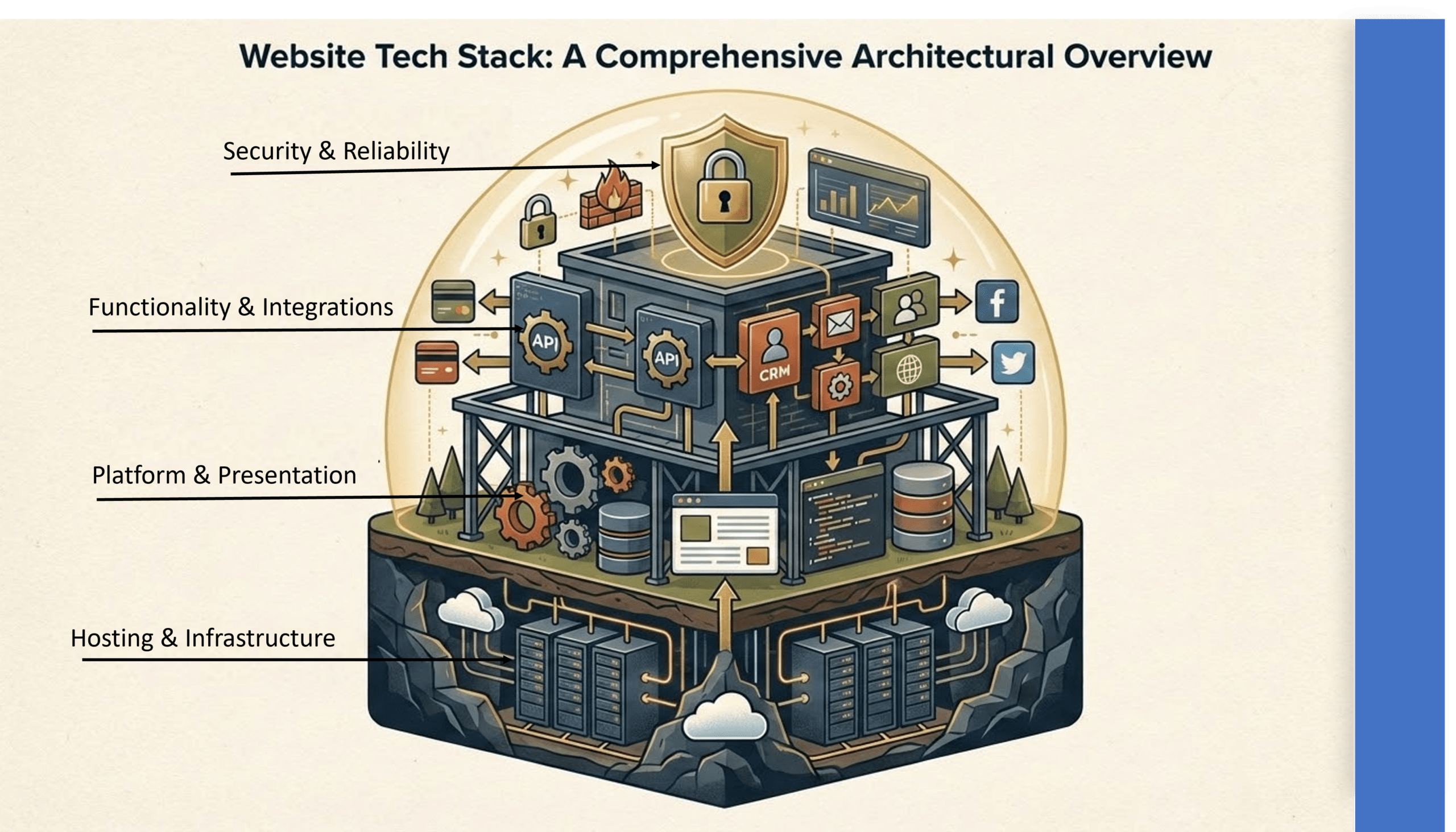
A web stack isn’t just WordPress, or a theme, or a few plugins. It’s a layered system that flows from infrastructure → platform → presentation → functionality → security → monitoring.
Each layer depends on the stability of the layer beneath it. If you cut corners at the bottom, everything above it becomes fragile.
Think of it like a building:
- You don’t choose countertops before the foundation
- You don’t install windows before the walls
- And you don’t invite customers in if the structure isn’t sound
Let’s break down each layer and why it matters.
1. Hosting & Infrastructure: The Foundation Everything Depends On
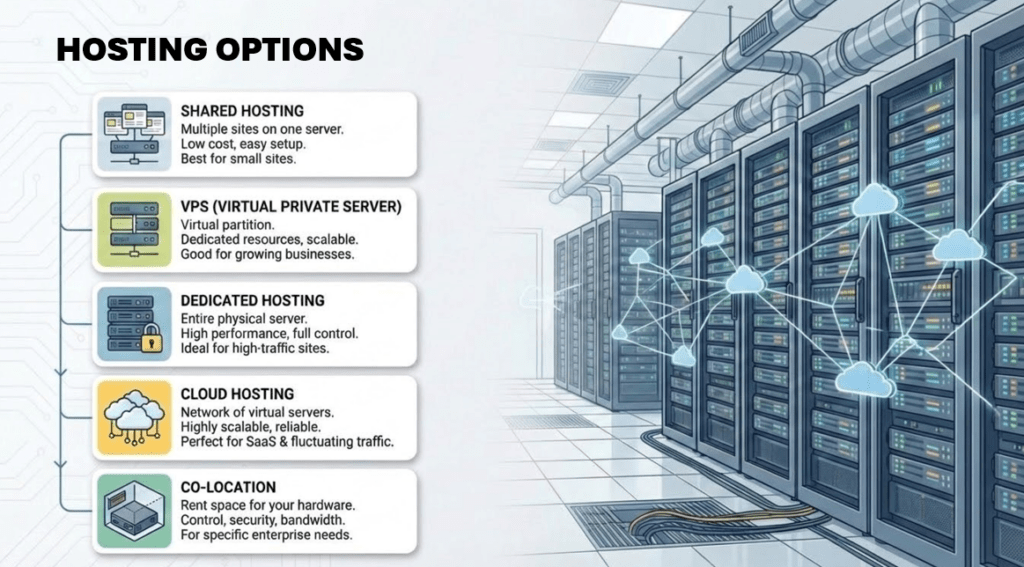
This is the layer most people ignore until something breaks. That’s like ignoring the foundation of your house until a crack shows up in the ceiling. There are many options here and what you choose depends on your business and how you use your website.
Most people use shared hosting unless they are enterprise level client, like Canon USA. You will find more detail on shared hosting below. If you need further detail on larger hosting options, please contact us and we will share detailed options that meet your needs.
Managed Hosting Platform
Your hosting platform provides the environment everything else runs in.
A proper managed hosting platform gives you:
- A stable, secure, performant environment
- Automatic updates and security patches
- Regular backups
- Uptime monitoring
This layer provides the server, database access, and the first line of security. WordPress, plugins, forms, CRMs—everything depends on it.
Cheap hosting saves money until it costs you leads, downtime, or a breach.
Database
The database stores:
- All your content
- Site settings
- User accounts
- Form submissions
- Server Side Tracking
Typically this is MySQL or PostgreSQL. WordPress and its plugins rely on it completely. If the database slows down, errors out, or gets corrupted, your site doesn’t “kind of” break—it stops functioning.
Caching layers sit on top of the database, but they can’t save you if the database itself is unstable.
Object Cache
Object caching stores frequently used data in memory:
- User sessions
- Site options
- Repeated queries
This reduces database load and dramatically improves performance for dynamic sites. It sits between WordPress and the database, improving speed across the entire site.
Without it, traffic spikes or complex plugins can overwhelm your database.
Page Cache
Page caching stores fully rendered HTML pages so they don’t have to be rebuilt on every visit.
This is critical for:
- Speed
- Scalability
- Handling traffic surges
Page caching relies on the web server and object cache and must be smart enough to handle logged-in users, dynamic content, and forms without breaking functionality.
Caching Services (CDN)
A CDN serves static assets—images, CSS, JavaScript—from edge locations close to the user.
It sits in front of your hosting layer, reducing load and speeding up delivery worldwide. When combined with page and object caching, it creates a fast, resilient experience even under heavy traffic. Most hosting companies offer CDNs with their hosting package. And most are using the ever-popular light version of CloudFlare.
DDoS Protection
DDoS protection filters malicious traffic floods so real users can still reach your site.
It operates at the network edge, shielding:
- Hosting
- Database
- Application layers
Without it, a single attack can take your business offline.
2. Platform & Presentation: The Core Site and How It Looks
Once the foundation is solid, you build the actual site. Everything we discuss here are the tools you will use to work on your site and build on it.
Platform (WordPress or Similar)
The platform manages:
- Content
- Users
- Core functionality
It runs entirely on top of your hosting, database, and caching layers. A weak infrastructure makes even the best platform unstable.
Theme
Your theme defines:
- Layout
- Typography
- Base styles
It must be compatible with:
- The platform
- The page builder
- Your caching setup
A bloated or poorly coded theme can undo all the performance gains you built below it.
Page Builder
Page builders provide visual, drag-and-drop editing for pages and templates.
They generate HTML, CSS, and JavaScript that caching layers must handle efficiently. Poorly configured builders can break page caching, slow load times, and create unpredictable behavior.
The tool isn’t the problem—the lack of stack awareness is.
Sliders / Carousels
Sliders and carousels should be used sparingly for:
- Hero banners
- Testimonials
- Featured content
They’re usually built into the page builder or via lightweight plugins. If implemented poorly, they can hurt performance and interfere with caching.
3. Functionality & Integrations: What the Site Actually Does
This is where your website stops being “brochure-ware” and starts making money. Plugins are the magic in WordPress enabling non-developers to authenticate 3rd party apps, add code to the header, install all google products, CRM integrations, and more.
Plugins (Core Utilities)
These handle:
- SEO
- Performance
- Security
- Backups
- Analytics
- Forms
They all run on top of the platform and must be compatible with:
- Hosting
- Caching
- Database performance
More plugins doesn’t mean more power—it often means more risk.
APIs
APIs connect your site to external systems:
- Maps
- Payments
- Calendars
- CRMs
- Email tools
They rely on stable hosting, secure storage of API keys, and predictable performance. If the foundation is shaky, integrations fail silently—and you lose data without realizing it.
Forms
Forms capture:
- Leads
- Contact requests
- Applications
- Payments
They run on top of plugins and the platform, then feed data into CRMs, calendars, and email tools.
If forms break, your business breaks.
Calendars / Booking
Booking tools manage:
- Appointments
- Events
- Scheduling
They often rely on external APIs like Google Calendar or Calendly and integrate tightly with forms and CRM systems. A small configuration issue here can create missed appointments or double bookings.
CRM
Your CRM manages:
- Leads
- Clients
- Follow-up workflows
Your CRM receives data from forms and calendars and often triggers automations. If integrations fail, sales teams blame people—when the real issue is the stack.
Email Tools
Email systems handle:
- Transactional emails
- Marketing campaigns
They depend on clean integrations with CRMs and forms and often rely on external delivery services. Poor configuration can mean emails never arrive, even though everything “looks fine.”
4. Security, Spam, and Reliability: Protecting What You Built
This is where you stop assuming things will work and start ensuring they do.
Security Plugins and Practices
These include:
- Firewalls
- Malware scanning
- Login hardening
- Regular updates
They run on top of your hosting and platform and must not interfere with caching or forms. Security that breaks functionality is just as dangerous as no security at all.
Spam Protectors
Spam protection uses:
- Invisible checks
- Time-based validation
- CAPTCHA alternatives
They integrate directly into forms and comment systems. They must reduce fake submissions without breaking accessibility or caching behavior.
Backups
Backups should include:
- Full database
- Full file system
- Off-site storage
Restores should be tested regularly. A backup you’ve never restored is not a backup—it’s a hope.
Dev Site (Staging)
A staging site is a private copy of your live site used for testing changes.
It mirrors:
- Database
- Files
- Configurations
It must stay in sync without overwriting production. This is how professionals make changes without risking revenue.
5. Monitoring & Maintenance: Keeping the Engine Running
A serious web stack is monitored, not guessed at.
Site Stats to Monitor
You should be tracking:
- Uptime
- Response time
- Traffic patterns
- User behavior
- Form performance
- Errors
- Security events
These rely on hosting, caching, and analytics tools. Alerts should tell you when something breaks—before customers do.
Health & Maintenance Tasks
Maintenance isn’t optional.
- Weekly / biweekly:
Check uptime, performance, security alerts, and test key flows - Monthly:
Run backups, update core/theme/plugins, audit unused plugins - Quarterly:
SEO and UX review, security scan, performance audit - Annually:
Hosting plan review, design refresh, tool consolidation
Every task depends on all the layers below it and must respect caching, backups, and dev-to-live workflows.
Protect the Stack That Pays the Bills
Your web stack flows from infrastructure → platform → presentation → functionality → security → monitoring. Each layer depends on the ones below it.
This isn’t theory. It’s not over-engineering. It’s protecting the system that:
- Generates your leads
- Closes your sales
- Books your calendar
- Pays your bills
You built this on your own. You didn’t come this far to lose revenue because of a cheap host, a broken form, or an untested update.
Treat your web stack like what it is: a business asset.
Protect it like it matters—because it does.